Khaberni - Have you ever tried to take a very small picture and then tried to enlarge it online without using image quality enhancement, only to find yourself in the end staring at what resembles a pile of pixels? Yes, it seems like the universe suddenly decided that your picture doesn't deserve to be clear. The colors become strange, the edges jagged, and the details are lost, and suddenly the perfect image turns into a digital disaster.
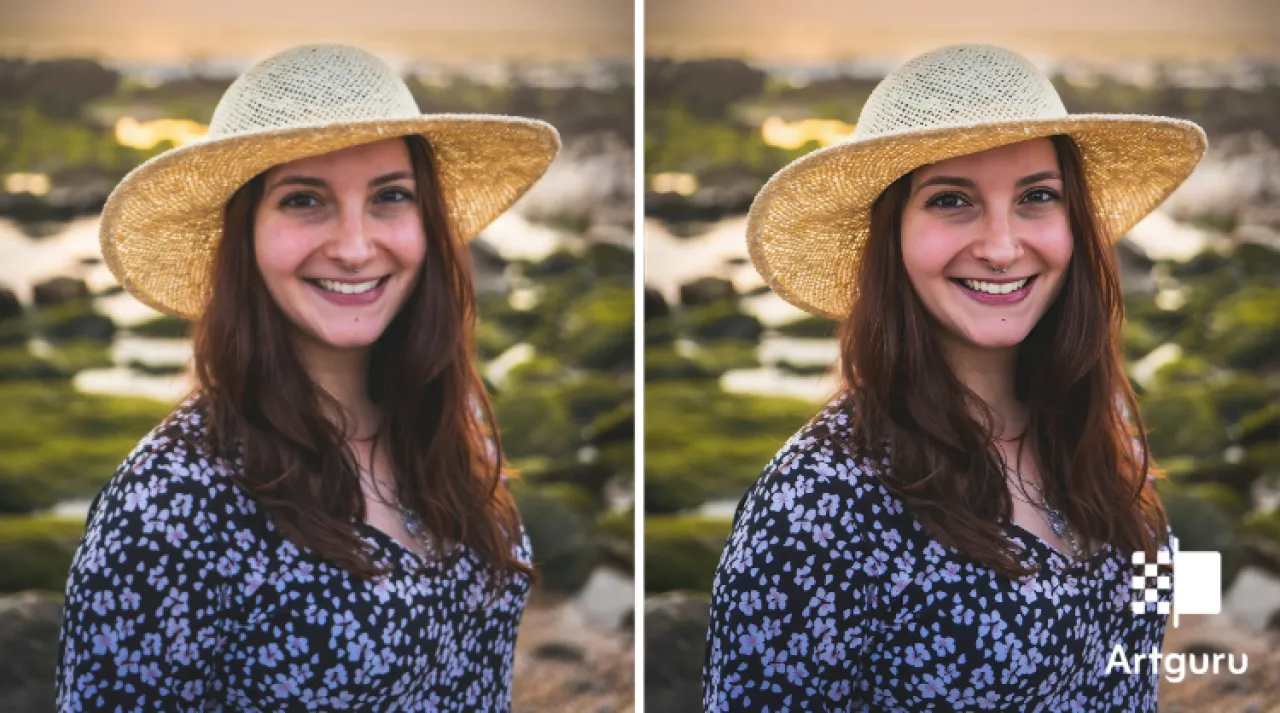
But, there is good news; you can easily solve this problem, and no, it does not require spending long hours on Photoshop or dealing with settings you don’t understand. Artificial intelligence tools like Artguru can enhance image quality by turning small, blurry, or low-resolution images into completely clean, sharp, and high-resolution versions in the blink of an eye. This applies whether the image is intended for social media, a blog, e-commerce stores, or even old photos you want to restore. Artificial intelligence-enhanced resolution technology breathes new life into every image. All you have to do is enhance the image quality, let the tool work, and then upload a picture that already looks great.
What happens when you enhance image quality the wrong way
Most people just drag the corners of the image, hit "resize," and pray that the process works. This is a grave mistake. What you'll end up with are unclear edges, intertwined textures, and colors that seem faded and murky, making image clarification impossible. You may notice that the text has turned into small blocks or that some details have completely disappeared. Stretching the pixels this way is like trying to make a full pizza from a single slice—it doesn't work. Traditional methods can’t invent what wasn’t there; they simply make what is there worse.
AI-enhanced resolution is different. It looks at your picture and thinks: "Okay, this is what is missing, and this is what this part should actually look like," and then fills in the gaps. So, your small, miserable picture turns into something with real visual meaning.
How modern image quality improvement actually works
AI-enhanced resolution works by studying the patterns, edges, textures, and colors in your image, and comparing them to millions of other images it has seen before. It doesn’t just stretch the pixels — it intelligently rebuilds the details. This means your image can get larger, but it won’t look like a mess of squares and smudges.
This is exactly where Artguru shines. Artguru is not just a traditional tool that captures a passing snapshot; it is a keenly observant artificial intelligence that can distinguish faces, objects, and landscapes, as well as the fine textures that give the image a vibrant appearance. Artificial intelligence improves your images' size and clarity without losing their realism, so they don't look like cartoon drawings that underwent excessive processing. In addition, Artguru also offers an easy background removal feature, allowing you to edit images and use them in designs or product photos quickly and professionally. Artguru also supports video quality enhancement with artificial intelligence, helping you transform low-resolution video clips into clearer, higher-quality videos.
Step by Step: How to Improve Image Quality Using Artguru
The resolution-raising process with Artguru is amazingly fast and somewhat enjoyable. Here's how to do it:
Step 1: Enhance the quality of images you want to improve
Go to Artguru, click on "upload images," and choose what you want. Designs for social media, scanned photos, logos, screenshot captures, selfie pictures—almost everything works. Artguru automatically recognizes the type of image, so there's no need to fumble through confusing menus.
Step 2: Choose to enhance image quality and let Artguru process it
、Click on "enhance image resolution" and let the magic happen. Artguru will:
Enlarge your image without distorting the edges
Restore the fine textures and details that typically disappear
Smooth out clumped pixels without making the image look fake
Preserve the natural colors and contrast
It's like sending your picture to a spa—it comes back refreshed, full of details, and ready to shine online.
Step 3: Upload the high-resolution image
After a few seconds, suddenly—the high-resolution image is ready to be downloaded. Post it, print it, or put it on your website without worrying about blurriness. Got a folder full of images? Use batch processing and enhance image quality at once. The process is fast, smooth, and somewhat addictive.
Practical Tips to Avoid Blurriness When Enhancing Image Quality
Even artificial intelligence can't perform miracles with every file, so:
Start with the best original quality you have
Don't over-enlarge very small images by 1000%, for example—AI capabilities have limits
Keep an eye on texts and edges; sometimes simple manual adjustments help
Use batch processing for consistent results
Adjust colors slightly if something seems unnatural after resolution enhancement
A few small steps now can save you a lot of trouble later.
Conclusion
Enhancing image quality online doesn't have to be a nightmare at all. Artguru can transform even the smallest, blurriest, or lowest resolution images into clean, sharp, and high-resolution versions in just a few seconds. What used to take hours of fiddling with software in the past now happens without any effort. AI-enhanced resolution can revitalize your social media posts, blog graphics, e-commerce product photos, or any old memories you scanned and want to keep. No more pixelated mess or blurry enlargements that give your work an untidy appearance. Simply enhance image quality, let Artguru do its magic, and then upload a picture that truly looks like it was meant to be high-resolution. Upgrade smartly, not laboriously.